



Integrations
BoxLock + Zapier
Connect BoxLock events to thousands of applications with no-code automation workflows.

Screenshots
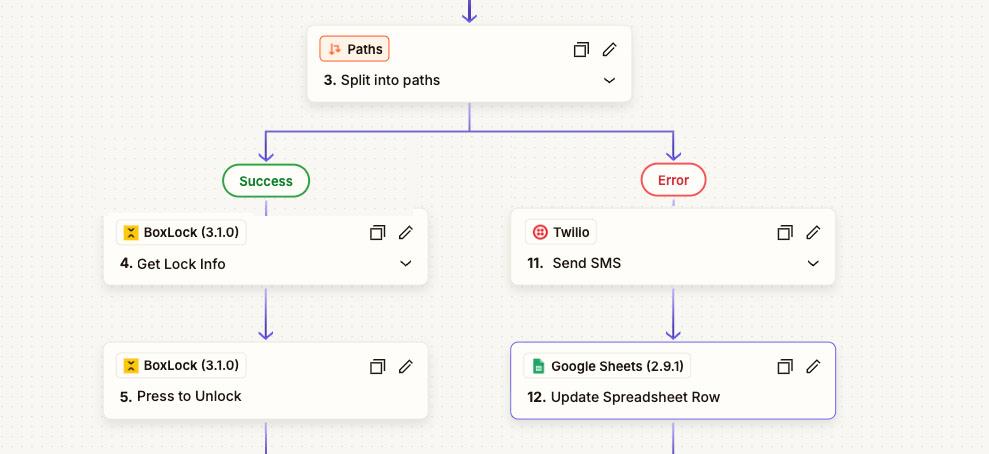
With Zapier enabled you can
- Automate workflows between BoxLock and other applications
- Create triggers and actions involving BoxLock events
- Simplify data transfer and streamline operations
Integration Summary
The integration with Zapier unlocks automation by connecting BoxLock with applications across Zapier's app directory. Teams can build automated workflows, called Zaps, triggered by events in BoxLock or other connected systems.
How it works
- 1Connect your BoxLock account to Zapier
- 2Create Zaps with BoxLock triggers such as new events or updates
- 3Define actions in BoxLock or external apps based on those triggers
- 4Run automated workflows that reduce manual work and improve execution speed
Applications
- Dispatch notifications from BoxLock events
- Sync event records into reporting systems
- Trigger tasks in team collaboration tools
- Connect delivery and access workflows to external systems
Other Integrations
Explore Other Integrations
See additional BoxLock integration workflows and platform connections.

Milwaukee One-Key integration for tracking.

Turn ACC drawings into live lockout dashboards with current field status.

Integrate access and activity data with enterprise systems of record.
Activate Connected Workflows
Bring partner data into a single operational access control system