


Intelligent LOTO for Data Centers
HyperscaleArc Flash Defense
The rapid pace of data center construction is pushing the limits of what can be accomplished safely. While hazardous energy isolation can be tedious, it's crucial to reducing the risk of arc flash incidents which can cost millions of dollars in damages, compromise project schedules, and potentially cost lives. Leading owners, general contractors, and electricians trust BoxLock's connected lockout tagout (LOTO) solution to isolate and track thousands of points in real-time on today's most complex data center projects.
Advanced Hazardous Energy Control
BoxLock's digital lockout tagout solution works across mechanical, electrical, and plumbing systems to ensure that single-line drawings are updated in real-time, reflecting the work that's been completed, not just what's been reported. BoxLock's unique combination of connected padlocks and smart LOTO tags provides robust protection for group LOTO boxes and unparalleled tracking for complex energy systems.

Energy Marshalls and tradesmen prefer BoxLock's approach because it implements your safety program and single-line drawings without replacing them. This reduces friction, improves accountability, and keeps you in control of timelines.
BoxLock provides a single source of truth with
Real-time LOTO status
Automated energization logs
A range of deployment options
Built for the Scale and
Speed of Modern Data Centers
Data center construction runs on aggressive timelines with thousands of energization points across electrical, mechanical, and plumbing systems. Traditional lockout workflows struggle to keep pace.
How BoxLock keeps projects on track
- Integrates with existing single-line drawings and safety procedures
- Lets Energy Marshals and trades document isolations in real time
- Provides accurate live system status across commissioning and maintenance
- Reduces arc flash risk while protecting schedule integrity
Your Drawings. Your Control
Put your facility drawings to work with BoxLock’s powerful Single Line Drawing Editor. Map isolation points, define power sources, and connect drawings in one place
- Map isolation points and power relationships
- Link drawings across connected systems
- Navigate quickly with keyboard shortcuts
Work natively in BoxLock or use single line drawings from Autodesk, Fieldwire, or Bluebeam


Single Line Drawing Editor
Map isolation points and define power relationships in your drawings
Field Status. In View
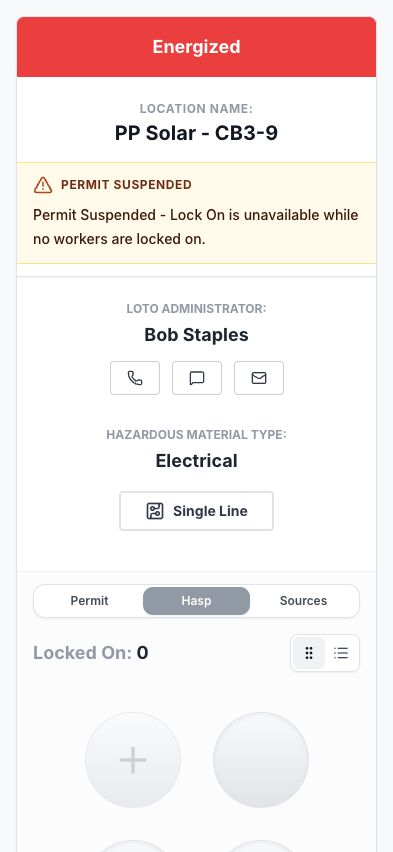
Scan a LOTO tag to see the isolation point’s reported status, recorded worker participation, and linked drawings. Contact the LOTO administrator or request a worker’s lock removal from the same view
- Open linked drawings at the point of work
- Request lock removal and document forced removal
- Find LOTO administrator contact details

LOTO Logs and Reporting
Connected padlocks automatically log lock events. Badge and key scans record worker participation and custody; reported status records provide operational context. Review the activity together and export it for handoff
- See LOTO status across location groups
- Review active locks and worker activity
- Identify locks applied the longest
- Export reports for review and handoff
The Operating Picture
Review organization status and compare isolation activity across location groups
Connected devices. Group LOTO
First On. Last Off
Control access to isolation keys. BoxLock Intelligent Padlocks open for the first worker on and the last worker off. Between those points, the connected lock stays closed as workers join and leave
Scan In. Isolate
The first worker scans their badge to open the connected lock and check-in the keys for physical isolation. Key scans record check-in and check-out
Each Worker Counts
Each subsequent worker scans their own badge to join and leave the group lockout. Their participation keeps the connected lock closed until the last worker locks off
Last Off. Keys Accessible
The last worker scans off and the connected lock opens, providing access to the isolated keys. Keys can be checked out and are automatically assigned to the last worker


1 / 3
Complex Group Lockout with BoxLock Padlock
Permits, locks, and tags
Control Where Work Happens
Connect work permits, key custody, and printed tags to the locations your crews work on
Permit to Work
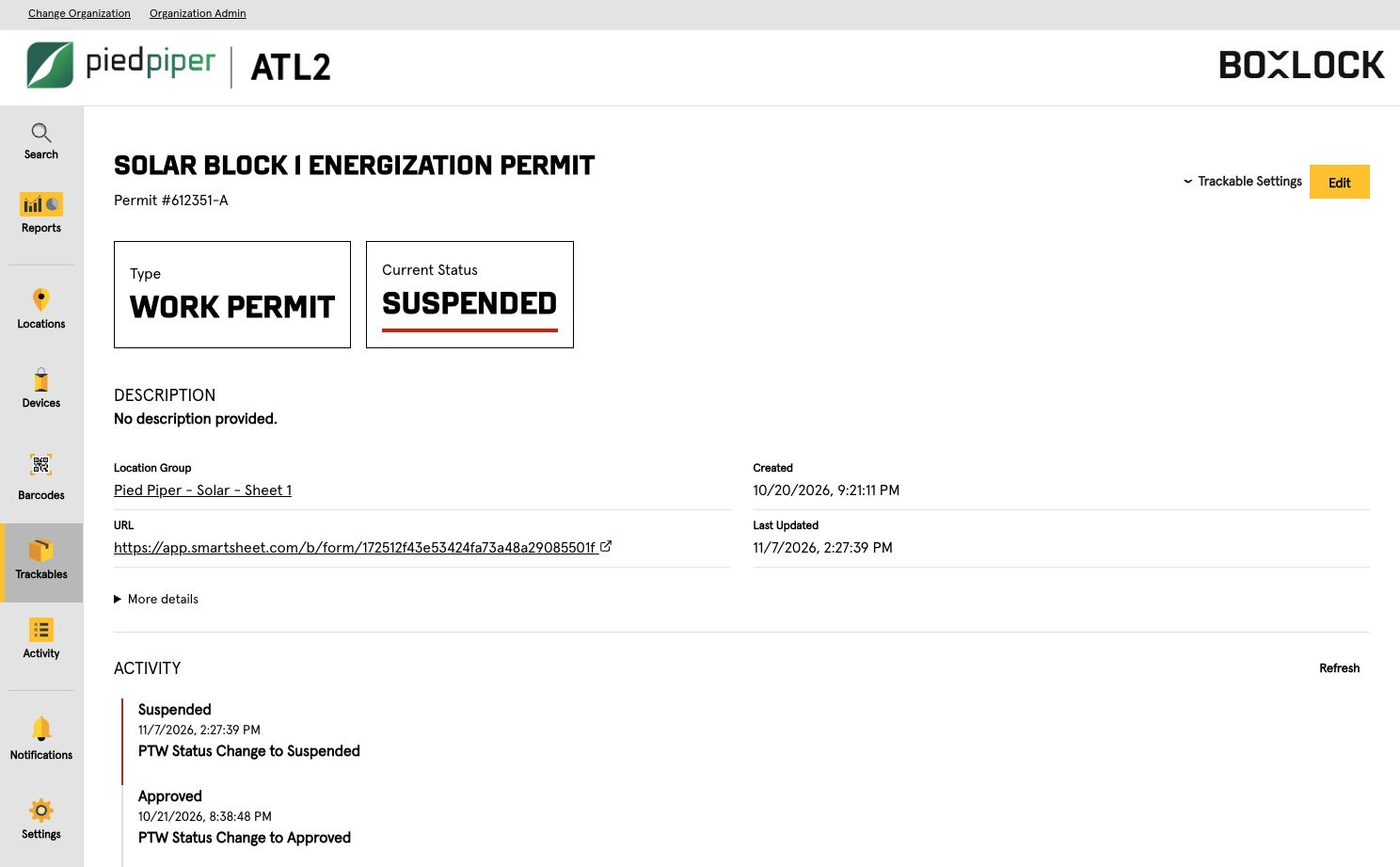
Keep permission and isolation in the same picture. See which work is approved, active, or complete
- Link permits to locations and groups
- Track requested, approved, active, suspended, and completed status
- Review timestamped activity

Track Every Key
Scan keys at check out and check in to record who holds them
- Match BoxLock keyed locks and keys by serial number, QR code, and color
- Review recorded key custody at the station
- Connect key custody to the group LOTO workflow
LOTO Tag Printing
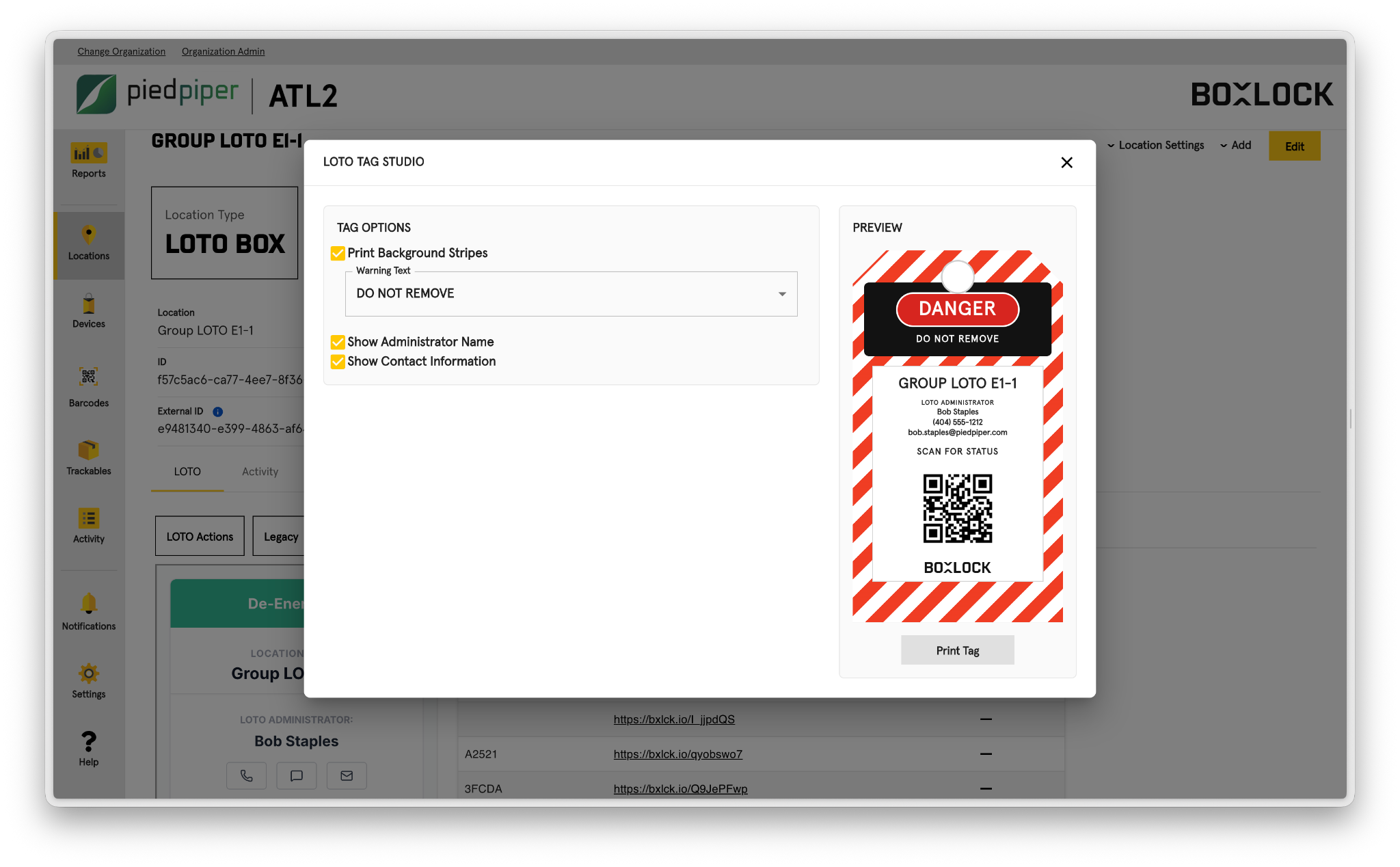
Make the tag a direct link to the work. Print location specific QR tags that open digital status
- Choose warning text and background stripes
- Include administrator and contact details
- Preview before printing
Keep Commissioning Moving
Control energization workflows with live lockout visibility and audit proof